For job sites
Site report photos that explain themselves
Every photo carries its project, number, date, time and address. A year from now, nobody has to ask which unit it was or when the wall was closed.
Free in the online tool and in the app.
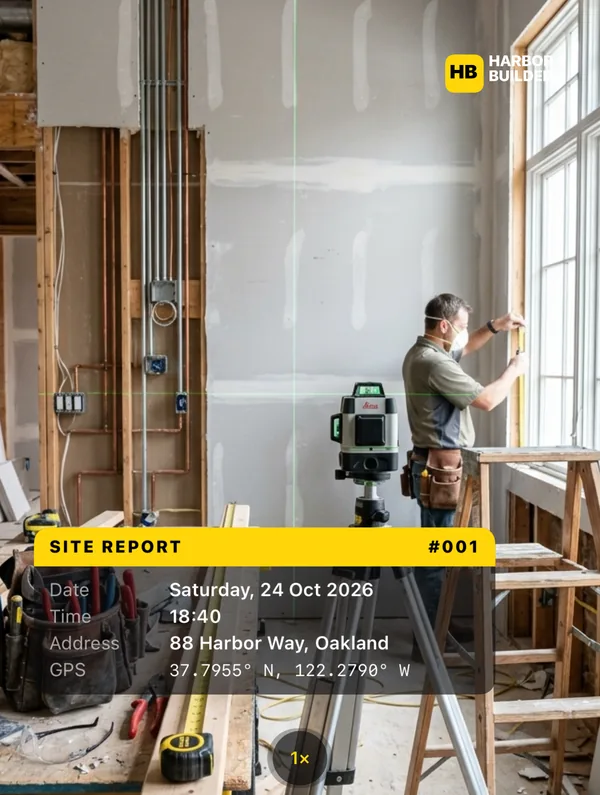
What's on a Site Report stamp
- Project
- The job, the building or the unit.
- Photo number
- #001, #002, #003 on each photo, so a set stays in order.
- Date and time
- Always the real date. Work stamps can't be set to another day.
- Address and GPS
- Found from the phone's location, or a place you type in.
- Note
- A short line such as "Kitchen, before drywall".
When teams use it
- Before, during and after. Record a wall before it's closed up, and the finished room after.
- Handover and snagging. Number each defect and send the set with its dates.
- Progress reports. Show the client what was done, and when, without a separate caption.
- Inspections and insurance. Keep a dated record of how a site looked.
With Pro
Add your company logo and a watermark to every photo, switch coordinates to UTM or MGRS, and add altitude, accuracy and compass direction. Burst records a series of shots, each with its own time.
Questions
Is Site Report free?
Yes. Site Report is one of the three free stamps, with 5 stamped photos a day in the app. Pro removes the limit and the ads.
Can someone change the date on a Site Report stamp?
Not in PhotoStamp Pro. Work stamps always print the real date, even if another date is set for the personal stamps.
Can I add my company logo?
Yes, with Pro. The logo goes in the corner away from the stamp, on every photo.
Can I stamp photos I already took?
Yes. Pick a photo from your library in the app, or use the free online tool for a single photo.