For deliveries and finished jobs
Proof of delivery photos, settled at a glance
A green tick, the stop number, the time and the address, right on the picture. One look answers "was it delivered?" and the photo goes wherever you send it.
Proof can be tried online. Saving it is part of Pro in the app.
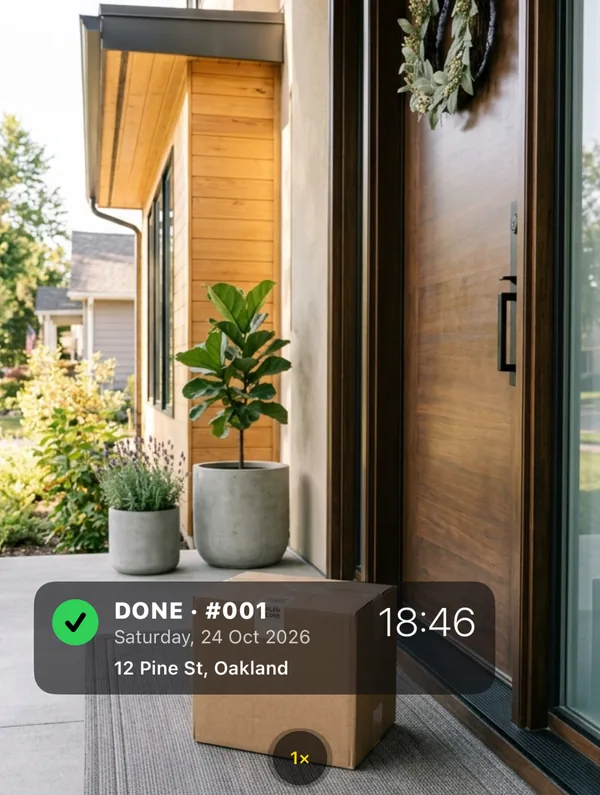
What's on a Proof stamp
- Done and a number
- A green tick with DONE · #001, counting up with each photo.
- Time
- Large enough to read in a chat thumbnail.
- Date and address
- Always the real date, with the address from the phone's location.
- Route and note
- A project line such as "Route 12 · Stop 8", and a note such as "Left at front door".
When it helps
- Parcels and couriers. Show where a parcel was left, and when.
- Cleaning and maintenance. Show the finished job before you leave the property.
- Field service. Attach a dated photo to the job, ready to send to the office.
- Disputes. The details stay on the image when it's forwarded, even when the app that sent it strips the file's data.
Questions
Is the Proof stamp free?
Proof is a Pro stamp in the app, with a 3-day free trial on the Weekly plan. You can try it on one of your own photos in the online tool first.
Do the details survive when I send the photo?
Yes. They're part of the picture itself, so they stay when a messaging app removes the file's hidden data.
Does it replace a signature?
No. It's a clear record of the time and place of a photo, and many teams use it alongside their own delivery process. It isn't a legal guarantee.
Can the date on a Proof stamp be changed?
Not in the app. Work stamps always print the real date.